Gendan EngineCheck Pro USB package
|
Gendan EngineCheck Pro Engine Diagnostics USB package
|
Includes VAT! -
FREE delivery!
was £ 109.94
Availability:
 In Stock!
Shipped same working day.
£ 99.95
Availability:
In Stock! Shipped same working day.
|
|
|
Product Code: ENG327P
Product rating:

(14 reviews)
Review this product
Share this product
|
Product details
Please note - to reduce our use of single-use plastics, we no longer supply the software on CD.
Download links for the software, and details of how to activate will be emailed to you when we despatch your order.
Tired of looking at expensive tools? Look no further -
engine-management diagnostics on all 2001+ petrol and 2004+ diesel
cars for less than £100!
 16June 2006
EngineCheck wins PCW
Recommended Award
"Gendan EngineCheck 1.4 is a great low-cost tool for car enthusiasts
that could quickly pay for itself"
Features:
- Read and clear stored and pending engine fault codes
- Switch off Check Engine light
- Read freeze-frame data
-
Built-in database of over 21,000 fault code definitions (generic and manufacturer-specific)
- Print customer fault code reports
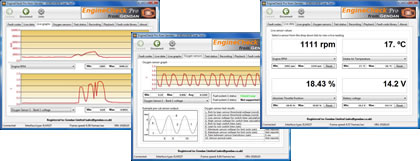
- View live engine information in meter or graph format
- Software written and supported by us here in the UK
- Recording and playback of sensor data
- Save recordings to CSV file
- View on-board test completion status (inspection/maintenance tests)
- View fuel-system status
-
Package includes USB diagnostics interface with 1.8m cable to connect to car, carry case
and user manual. (Software download details supplied by email)
Package contents:
- Vgate vLinker FS USB interface
- EngineCheck Pro software download, activation and licence details (supplied by email -
to reduce our use of single-use plastics, we no longer supply the software on CD)
- Printed manual and quickstart guide
- Plastic carry-case
PC requirements
The minimum system requirements for the Gendan EngineCheck Pro software are:
- Desktop, laptop or notebook PC
- Pentium processor running at 300MHz (or higher)
- Windows 10 or 11. (Windows 7 & 8.1 may work but are unsupported)
- Approx. 100MB of hard disk space
- USB port
Product returns
Please note the price of this item includes a licence for the EngineCheck Pro software, which requires
activation before use.
If the product is returned to us as an unwanted item, or because it was purchased for an incompatible
vehicle, we cannot provide a refund of the cost of the software (£57.14) once an activation code has
been requested.
The remainder of the cost of the item may be refunded, in line with our standard
returns policy.
|
Product comparison
|
Feature
|
EngineCheck package
|
EngineCheck Pro
|
|
Package contents
|
- Vgate vLinker FS USB interface
- Software supplied as download
|
- Vgate vLinker FS USB interface
- Software supplied as download
- Printed user manual
- Hard plastic carry case
|
|
Fault code definitions
|
Generic (P0xxx/P2xxx etc) only (over 4,700 definitions)
|
Over 21,000 definitions - generic & manufacturer-specific
|
|
Live engine sensor data
|
Yes
|
Yes
|
|
Live oxygen sensor graphs
|
Yes (subject to vehicle support)
|
Yes (subject to vehicle support)
|
|
Mode 5 oxygen sensor test results
|
No
|
Yes (subject to vehicle support)
|
|
Control module support
|
Engine management & emissions
|
Usually engine management & emissions only, but if other modules respond on EOBD protocols, will offer each module for connection
|
|
Printable pages
|
- Fault code report
- On-board test results
|
- Fault code report
- On-board test results
- Oxygen sensor info
- Live data graphs
- Recorded data playback
|
|
Software updates
|
Free
|
Free - typically released 3-6 months before EngineCheck
|
Software updates
Software updates are free for existing customers.
You can check the software version of the latest release, download updates and manage your activation codes online by registering with our free software control panel.
|


